
Best Free AI Video Generators in 2026: We Tested 5 Platforms for $0

Can you actually generate a usable, HD AI video for $0—without hitting a paywall or rendering a nightmare with six fingers?
We put a $20 testing budget on the line to benchmark five of the biggest AI video generators on the market: Luma, Hailuo, Kling, Pika, and Runway.

Instead of just reading feature pages, we ran all five tools through a single, brutally difficult continuous-shot prompt. Here is what happened, which tools failed, and how we managed to complete the entire benchmark spending $0.
Some platforms made the first video surprisingly easy. Others introduced limitations before we could complete the full workflow. And that's where the research became more interesting. Generating one video is getting easier, but creating multiple connected shots while keeping the character, scene, and visual style consistent is still a challenge.
What We Tested: 5 Free AI Video Generators
Feature lists on a landing page rarely tell you what using a tool actually feels like.
To find out what a beginner or solo creator experiences, we signed up for five popular platforms and tested their full creator journey:
Sign-Up & Onboarding Friction: How fast can a beginner render their first clip?
Prompt Assistance & Ease of Use: Does the UI guide you, or leave you staring at a blank prompt box?
Credit Burn & Failures: How forgiving is the pricing when a render glitches?
Storyboarding: Can you build a multi-shot story, or are you stuck with isolated 5-second clips?
The 5-Point Quality Test
To keep comparisons fair, every generator was scored on five specific visual mechanics:
Text Rendering: Can it spell "CYBER CAFE" on a neon sign without turning into gibberish?
Camera Movement: Does the camera pan smoothly without distorting the scene?
Physics & Interaction: Can the character pick up a coffee cup without her hand melting?
Visual Consistency: Do her blue hair and yellow jacket stay identical across frames?
Environment Adaptation: Does the lighting transition cleanly from daytime to neon-lit night?
"How We Tested" (The Master Prompt Callout)
To eliminate variables, we ran every platform through the exact same 10-second prompt:
🎯 The Benchmark Prompt:"A continuous panning shot starting on a glowing neon sign that reads 'CYBER CAFE,' moving down to a woman with short blue hair wearing a yellow jacket. She picks up a steaming cup of coffee from a table and takes a sip. As she drinks, the lighting in the background smoothly transitions from daytime to neon-lit night."
This prompt was designed to test more than simple text-to-video generation. It combines text rendering, camera movement, character details, object interaction, and an environmental lighting change in one scene.

For each platform, we looked at five core criteria:
1. Text Rendering | Could the platform correctly render the words “CYBER CAFE”? |
2. Camera Movement | Could it maintain the continuous camera movement without breaking the scene? |
3. Object Interaction | Could the woman pick up the coffee and drink it naturally? |
4. Temporal and Character Consistency | Did the blue hair and yellow jacket remain visually consistent? |
5. Lighting and Environment Adaptation | Could the scene move smoothly from daytime lighting to a neon-lit night environment? |
We also recorded the things a beginner notices before and after generating a video:
sign-up experience,
first-render friction,
prompt assistance,
credit usage,
failed generations,
multi-shot or storyboard options.
This gave us two different ways to look at each platform: how well it could generate the video, and how easy it was for a real beginner to get there.
Luma Ray3.14: The Strongest Free Starting Point
Cost Tested:
💰 $0 (Used 300 / 6,000 free trial credits)
Max Free Specs:
🎬 10 Seconds | 720p HD | 16:9
Benchmark Score: 5/5
🎯 (Passed on first attempt)
How Luma Performed
Text rendering — Good
The words “CYBER CAFE” were readable in the generated video.
Camera movement — Good
The movement from the neon sign toward the woman worked and the scene remained coherent.
Object interaction — Good / Acceptable
The coffee interaction and drinking action were successfully represented.
Character consistency — Good -- The woman's blue hair and yellow jacket remained visually consistent.
Lighting and environment — Good The transition from daytime lighting toward the neon-lit environment was smooth.
Overall, Luma gave us a usable first benchmark generation without a failed render, which is important when looking at the experience

Beginner experience
Readable Text: The "CYBER CAFE" sign rendered cleanly without letter warping.
Natural Physics: The coffee interaction looked fluid and realistic.
Generous Credit Pool: 6,000 trial credits give beginners room to make mistakes without instant paywalls.
💡 The Verdict: The single best playground for beginners who want to generate full HD clips without whipping out a credit card.
Hailuo AI: Strong Storyboard and Consistency Workflow
💰 Cost Tested: $0 (Used ~70 / 100 free sign-up credits)
🎬 Max Free Specs: 10 Seconds | 768p HD | 16:9
🎯 Benchmark Score: 4.5/5 (Minor text rendering variations across shots)
While most free tools generate one isolated clip and call it a day, Hailuo AI stood out for multi-scene consistency.
We ran the exact same CYBER CAFE benchmark to answer one key question: Can Hailuo move between camera angles without making our main character look like a completely different person?
Strong Character Retention: Her blue hair, yellow jacket, and facial features stayed recognizable across shot transitions instead of morphing randomly.
Higher Free Resolution: Rendered at a crisp 768p natively on the free plan (higher than most 480p/720p free tiers).
Story-First Workflow: Built specifically for creators who need a sequence of connected shots rather than just one standalone clip.
💡 The Verdict: The top pick for creators looking to build multi-scene video essays or storyboards without their character shape-shifting halfway through.
How Hailuo Performed

Beginner experience
For a beginner, this matters because creating a longer video is rarely about generating just one good shot. You usually need several connected scenes.
Hailuo's storyboard-oriented workflow makes that process easier to explore. There are still limitations, but the multi-scene approach gives you a better starting point when you want your video to feel like one continuous idea instead of a collection of unrelated clips.
Our takeaway: Hailuo was one of the more interesting options in our test for storyboard-style and multi-scene generation, particularly when consistency mattered.
Kling AI: More Control, More Flexibility
💰 Cost Tested: $0 (Used 63 / 66 free daily credits)
🎬 Max Free Specs: 7 Seconds | 720p HD | 16:9
🎯 Benchmark Score: 5/5 (Passed, but capped at 7 seconds on free tier)
Kling AI delivered some of the most realistic motion physics in our entire test, but it operates under tighter free-plan duration limits.
We ran the exact same CYBER CAFE benchmark to test if Kling could keep the complex scene details, coffee physics, and lighting transitions locked in throughout the motion.
Exceptional Physics & Realism: The coffee cup interaction and drinking motion looked natural, complete with realistic steam rising from the cup.
Flawless Camera Movement: Maintained continuous, smooth panning without tearing or distorting the café background.
Pinpoint Character Tracking: The woman's blue hair and yellow jacket stayed 100% consistent throughout the shot.
The Catch:
Strict Duration Cap: The free plan forced us to cap the video at 7 seconds instead of the full 10-second benchmark, and daily credits run out quickly.
💡 The Verdict: The top pick if you prioritize hyper-realistic motion physics and cinematic detail, as long as you don't mind working with shorter 5-to-7-second clips.
How Kling Performed
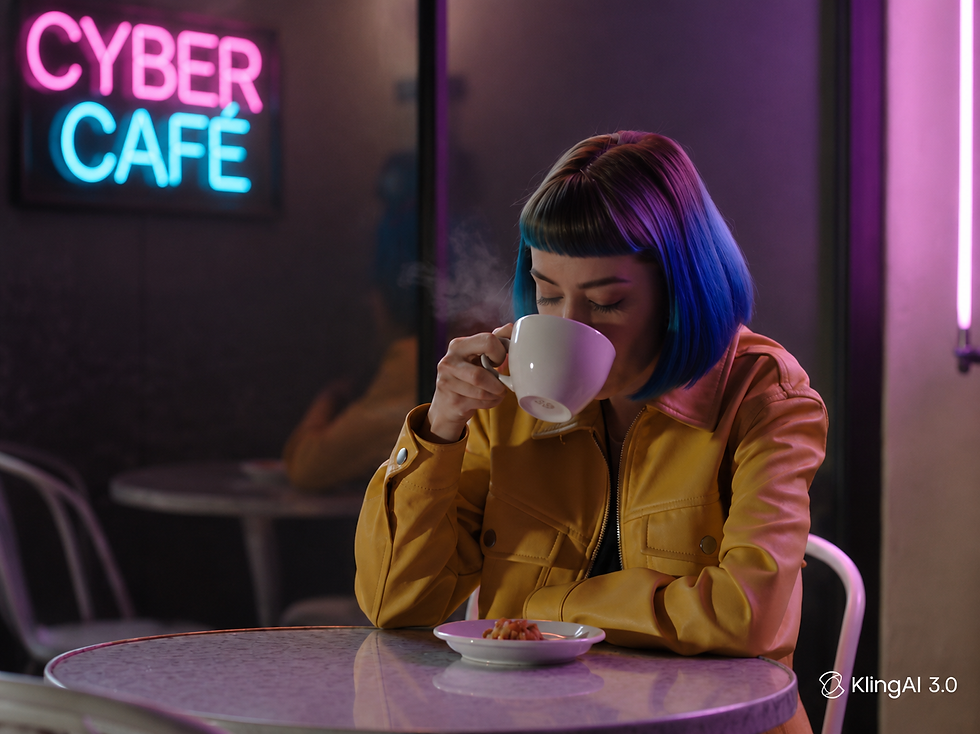
Beginner experience
For a beginner, the interesting part was seeing how the same prompt could be pushed beyond a single generated shot. Kling made the workflow feel more useful when the goal was to build a sequence rather than just create one image.
There were still differences between frames, but the overall result showed why character consistency and multi-scene control matter when choosing an AI video generator.
Pika: Simple and Easy to Start
Pika was the fourth platform we tested, and it felt more straightforward than some of the other tools we tried. We wanted to see whether a beginner could take the same CYBER CAFE benchmark and get a usable result without spending much time figuring out the workflow.
For this test, we used Pika 2.5 on the Basic plan with a 5-second, 480p, 16:9 generation. We started with 80 credits and used 12, leaving 68 credits after the test.
The interesting part was that Pika handled the main scene well, but the free-tier limits became noticeable when we looked at higher resolution and longer generations.
How Pika Performed
Evaluation Criteria | Rating | Observations & Performance |
Text Rendering | 🟢 Good | The "CYBER CAFE" text was clearly visible and easy to read. |
Camera Movement | 🟢 Good | Smooth panning motion kept the short sequence cohesive without breaking the scene. |
Object Interaction | 🟢 Good | The coffee interaction was fluid—the woman picked up the cup and drank naturally. |
Character Consistency | 🟢 Good | Her blue hair and yellow jacket stayed recognizable as framing changed. |
Lighting & Environment | 🟢 Good | The neon café atmosphere and nighttime lighting matched the prompt accurately. |

Beginner experience
💡 Overall Takeaway: Pika produced solid visual results on a simple prompt, making it great for quick tests. However, the main drawback isn't rendering quality—it's the strict free-tier limits (480p resolution and a 5-second max clip duration).
Runway: Powerful Tools With Free-Tier Friction and Paywalls
💰 Cost Tested: $0 (742 credits remaining, but animation step locked)
🎬 Max Free Specs: Image Frame Preview Only (Video Generation Paywalled)
🎯 Benchmark Score: 1/5 (Incomplete — Blocked on free plan)
Evaluation Criteria | Rating | Observations & Performance |
Prompt Workflow | 🟢 Good | Interactive guided wizard helped expand the prompt and build the concept. |
Visual Generation | 🟢 Good | Generated a crisp opening frame (Seedance 2) in 36 seconds. |
Final Video Generation | 🔴 Limited | Video animation step was locked behind a paid plan upgrade. |
Free-Tier Experience | 🟡 Friction | Paywall blocked video output despite 742 free credits in the account balance. |
Beginner Experience | 🟡 Mixed | Helpful interactive assistant, but hitting a paywall at the end creates high friction. |

Beginner experience
For a beginner, Runway feels more like a powerful creative workspace than a straightforward free video generator. The interface and guided workflow are useful, but the free-tier restriction matters if your goal is to actually finish a video without paying.
Our takeaway: Runway is interesting if you want more control over the creative process, but in our test, the free experience did not let us complete the full benchmark workflow.
BEST Free AI Video Generator: Comparison
Platform | Benchmark | Best for | Free-tier experience | Credits / cost tested | Beginner verdict |
Luma Ray3.14 | 5/5 | First-time video generation | Strong | 300 credits / $0 | Best free starting point |
Hailuo AI | 4.5/5 | Storyboards & multi-scene | Good | ~70 credits / $0 | Strong contender |
Kling AI | 5/5 | Control & shot-by-shot workflows | Good, but higher credit use | 63 credits for 7s / $0 | Best for control |
Pika 2.5 | 5/5 at tested settings | Simple creative videos | Limited for HD/10s | 12 credits for 5s / $0 | Easy, but restrictive free tier |
Runway Gen-4.5 | Not tested — plan blocked | Advanced creative workflow | High friction | $0 / generation blocked | Not ideal for fully free generation |
What We Learned as Beginners
Testing five platforms side-by-side completely changed how we evaluate free AI video tools. It’s easy to judge a platform by its landing page demos, but the actual creator experience comes down to workflow friction.
Here is what each platform taught us about generating AI video on a $0 budget:
🚀 Luma Ray3.14 (Smoothest Onboarding): Proved to be the fastest path from a text prompt to a finished render. Its generous trial credit pool makes it the most forgiving tool for beginners who need room to experiment.
🎬 Hailuo AI (Best for Storyboarding): Taught us to stop thinking in isolated clips. If you need connected scenes with persistent characters, Hailuo’s multi-shot workflow leads the pack.
🎯 Kling AI (Best Motion Realism): Offers incredible shot-level control and cinematic physics, but burns through free daily credits much faster than the competition.
⚡ Pika 2.5 (Best for Quick Sandbox Tests): Extremely beginner-friendly for fast 5-second ideas, but hits strict quality walls at 480p resolution.
🛑 Runway Gen-4.5 (High Paywall Friction): Showed us that having access to a platform isn't the same as rendering a video. Great prompt expansion tools, but blocked by a hard paywall at the animation step.
💡 The Golden Rule: The "best" free AI video generator isn't the one with the flashiest feature list—it’s the one that lets you turn an idea into a rendered, usable video with zero paywall barriers standing in your way.
Which Free AI Video Generator Should You Try?
Your Goal / Use Case | Recommended Tool | Key Reason / Takeaway |
Complete Beginner / First Video | 🏆 Luma Ray 3.14 | Smoothest onboarding with 6,000 trial credits and zero paywall traps. |
Multi-Shot Storyboards & Continuity | 🎬 Hailuo AI | Keeps character faces, clothing, and visual style persistent across shots. |
High Realism & Cinematic Physics | 🎯 Kling AI | Unmatched motion accuracy (coffee steam, fluid movement), capped at 7s on free tier. |
Quick 5-Second Sandbox Drafts | ⚡ Pika 2.5 | Fast and simple for rapid testing, though capped at 480p resolution. |
Conceptualizing & Prompt Building | 🛠️ Runway Gen-4.5 | Excellent interactive prompt wizard, but note that video animation is paywalled. |
💡 Quick Takeaway: If you just want to render a complete 10-second video today for $0, start with Luma. If you are building a multi-shot YouTube story, go with Hailuo.
Frequently Asked Questions
What is the best free AI video generator in 2026?
Based on our testing, Luma Ray3.14 was the strongest free starting point for beginners. It gave us a straightforward workflow from an idea to a finished video and allowed us to complete the benchmark without spending money.
Which AI video generator is best for beginners?
Luma Ray3.14 was the easiest starting point in our test. Its workflow was straightforward, and the available trial credits made it easier to experiment.
Can I generate AI videos for free?
Yes, but the free experience varies between platforms. Some provide trial credits, while others limit resolution, duration, or access to certain generation features.
Which free AI video generator is best for multiple scenes?
Hailuo AI stood out for multi-scene work because its storyboard workflow generated multiple connected panels from the benchmark prompt. Kling AI also offered strong shot-by-shot control.
Is Kling AI better than Luma for AI video generation?
It depends on what you need. Luma gave us the smoother beginner experience, while Kling provided stronger control over individual shots. Both produced strong benchmark results in our testing.
Is Pika AI free to use?
Pika offers a free experience, but our testing showed important limitations. The tested workflow was limited to 5-second, 480p output, while longer or higher-resolution generation required a paid plan.
Is Runway free for AI video generation?
Runway has a free experience, but our test could not complete the full video-generation workflow because the required generation step was blocked by the account plan.
How much did you spend testing these AI video generators?
We spent $0 during our testing. We kept the experiment within the planned $20 maximum budget and did not purchase a paid subscription.
Join the Conversation 💬
Which AI video generator are you planning to test first—Luma, Hailuo, or Kling? Drop a comment below and let us know what platform we should benchmark next!


Great research post, Noel.
Great Post, Noel. And Great Research. Lets do multi-scene research next. Thank you.