
Brainstorm Blog Topics with GSC & ALwrity AI


1. What Is This Feature?
The Brainstorm Topics feature analyzes your Google Search Console (GSC) data and suggests blog post ideas you should write.
It answers the question: "I run a website about [topic X]. What should I blog about next to get more traffic?"
The tool looks at which search queries are already bringing people to your site, finds underperforming content and keyword gaps, and uses an AI to recommend specific blog post titles with traffic estimates.
How to Use the GSC Brainstorming Tool to Uncover High-Traffic Blog Ideas
Once the ALwrity AI completes its analysis of your Google Search Console profile, it bypasses raw spreadsheets and organizes your highest-ROI traffic opportunities into five actionable marketing tabs.
Here is exactly how to read these insights to map out your upcoming editorial calendar.
Finding the right topics to write about can feel like guesswork. If you want to stop guessing and start targeting the exact terms your audience is already searching for, the Brainstorm Topics tool is your shortcut.
By securely connecting to your Google Search Console (GSC), this AI-powered feature scans your website’s real performance data, uncovers hidden keyword gaps, and hands you ready-to-write blog titles designed to maximize your organic traffic.
🚀 Why Use This Tool? (The Marketing Value)
Instead of relying on generic keyword tools, this feature looks at your site's unique relationship with Google. It answers the ultimate content marketing question:
"What should I write next to quickly boost my traffic and authority?"
It helps you discover:
Low-Hanging Fruit: Keywords ranking on Page 1 that just need a small push to reach the top spot.
Content Gaps: High-volume search terms Google wants to rank you for, but you haven't written a dedicated post for yet.
Underperforming Pages: Existing blogs with high visibility but low click rates that need a quick copy refresh.
Summary Dashboard (Shown at the top)

Metrics: Keywords: 342 | Impressions: 45.2K | Clicks: 1.2K | Avg Position: 14.2 | Avg CTR: 2.7% | Health: 42/100
Visuals: [Donut chart: position distribution]
SEO Health Context: 42/100 - Below average. 58% of keywords rank outside the top 20 results.
What to look for:
The numbers should reflect your actual GSC site data.
The donut chart segments should sum to 100%.
The health score explanation should match your distribution.
Hover over metrics to see tooltips explaining what each means.
Tab 1: Quick Wins (Your Page 1 Boosters)
The Insight: These are keywords where your website already ranks on the bottom half of Page 1 (typically positions 4–10). Google already trusts your domain for these terms, but you are missing out on the massive traffic reserved for the Top 3 slots.
Marketing Value: High-velocity traffic. You don't need to write a brand-new article from scratch here.
The Content Action: Take the existing blog post that ranks for this keyword and optimize it. Add fresh statistics, answer 2–3 more user-intent questions, improve your internal linking, or embed a helpful video to quickly push it into the top search spots.
Keywords already on page 1 (positions 4–10) that with small optimizations could reach the top 3.
What to look for:
Each item shows: keyword, current position, CTR, estimated traffic gain.
Keywords should be topic-relevant (related to your entered topic).
With a broad/well-trafficked topic: expect 3–5 items.
With a narrow/new topic: expect 0–2 items (this is normal — see Optimization 4).
Tab 2: Content Opportunities

The Insight: This tab splits your data into two critical performance buckets:
Content Optimization: Keywords with high impressions but low click-through rates (CTR). Google is showing your page to thousands of searchers, but users are scrolling past it.
Content Enhancement: Keywords safely sitting on Page 2 (positions 11–20) that are just a few strategic tweaks away from breaking onto Page 1.
Marketing Value: Immediate brand visibility fixes.
The Content Action: If the impressions are high but clicks are low, fix your wrapper. Rewrite your Title Tag and Meta Description in Wix to make them more enticing and clickable. If it's a Page 2 keyword, expand the article into a definitive guide to signal higher quality to Google. Two types of opportunities are evaluated:
Content Optimization: High impressions + low CTR (Google shows your page but people don't click).
Content Enhancement: Ranking on page 2 (positions 11–20) — a content boost could push to page 1.
What to look for:
Each item explains WHY this is an opportunity and gives an estimated traffic gain.
The "potential_impact" tag says "High" or "Medium".
The "suggested_format" recommends a content type (How-To, Listicle, etc.).
Tab 3: Keyword Gaps

The Insight: These are terms where your site has a footprint, but you lack dedicated, highly relevant content targeting the exact phrase. It highlights the exact "gap" (how many positions you need to climb) and the potential traffic multiplication if you hit the top slots.
Marketing Value: Strategic expansion. This tells you exactly what related sub-topics your audience expects you to cover.
The Content Action: Create new, highly focused supporting articles. For example, if you rank broadly for "vegan meal prep" but have a keyword gap for "vegan meal prep containers," it’s time to write a dedicated product roundup targeting that specific niche. Keywords ranking on page 1–2 (positions 4–20) that have untapped traffic potential if improved.
What to look for:
Shows gap_from_page1 (how many positions to improve).
Shows estimated_traffic_if_page1 (clicks if ranking #1–3).
Keywords should be topic-relevant.
Tab 4: Pages (Page Opportunities)

The Insight: Instead of looking at isolated keywords, this tab shifts the focus entirely to your physical URLs. It flags specific blog posts that are gaining solid impressions across Google but suffer from an underperforming CTR (below 2%).
Marketing Value: Maximizing the value of assets you already built.
The Content Action: Audit the user intent. Compare your page's title to the titles currently ranking in the Top 3. Are they offering a "Listicle" while you are offering a "How-To"? Align your headline format with what searchers are actively choosing to click on.
Individual pages with high impressions but low CTR (<2%).
What to look for:
Page URL + current CTR + suggested fix.
These are pages where the title/meta description needs rewriting.
Tab 5: AI Recommendations
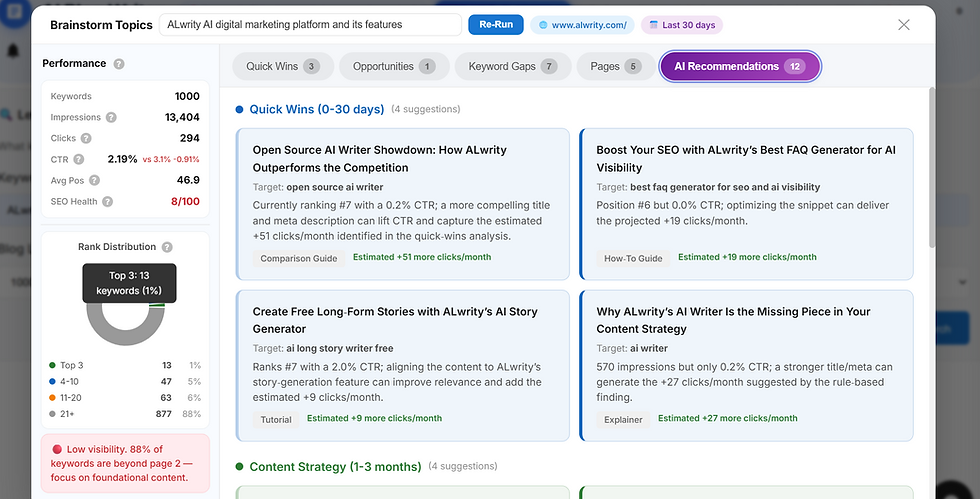
The Insight: This is where the technical data transforms into creative strategy. The AI blends the metrics from the previous four tabs to hand you ready-to-write article titles complete with target formats (e.g., Guide, Checklist, Listicle) and structural advice.
It breaks your roadmap into three distinct horizons:
Immediate Opportunities: Quick, specific articles to capture fast traffic.
Content Strategy: Deep-dive, pillar content ideas to anchor your primary topics.
Long-Term Strategy: Comprehensive, authority-building themes to establish your site as an industry leader.
Marketing Value: Complete elimination of writer's block. You get fully formed, data-backed titles that marry search intent with creative copy.
LLM-generated blog post suggestions based on all the data above. It is divided into three strategic blocks:
Immediate Opportunities: 3–5 specific blog posts you can write TODAY.
Content Strategy: 3–5 pillar/strategic content ideas.
Long-Term Strategy: 3–5 authority-building content ideas.
What to look for:
Each recommendation has a specific title (not vague — e.g., "10 Vegan Meal Prep Recipes Under 30 Minutes" instead of just "Write about vegan").
Each references the keyword it targets + WHY (based on the data).
Has a specific format recommendation.
Every recommendation relates to your entered topic.
Step 4: Use a Suggestion
Click anywhere on a suggestion to select it. The keyword/title is passed back to the Blog Writer input.
Expected result: The modal closes and the selected keyword/topic appears in the Blog Writer's topic field.
Quick Summary Checklist for Marketers
Want immediate traffic with minimal writing? Sort by Tab 1: Quick Wins.
Want to fix underperforming existing content? Check Tab 2 and Tab 4.
Want to expand your content pillars and map out next month's calendar? Dive straight into Tab 3 and Tab 5.
Behind the Scenes: Why This ALwrity Tool is Smarter Than Standard Keyword Research
Most keyword tools simply look at global search volume and hand you generic lists. The ALwrity AI engine works differently. It processes your data through four distinct, smart filtering layers to ensure every recommendation is tailored to your site's true authority and current niche focus.
🎯 1. Smart Keyword Overlap Scoring
Instead of overwhelming you with every single keyword your site ranks for (like your homepage or contact page), the system automatically scores and filters your GSC data against your entered topic. It instantly discards the noise and isolates only the phrases directly relevant to your target theme.
📊 2. Topic-Specific Context Enrichment
When passing data to the AI copywriter, the tool doesn’t just look at your top 5 global keywords. It extracts the top 25 most relevant contextual search terms, mapping their impressions, positions, and click-through rates. This deep data dump ensures the generated blog titles target real traffic gaps, not random guesses.
🔍 3. Semantic Similarity Filtering (Synonym Matching)
Search intent isn't always literal. The engine uses advanced AI embedding models to detect conceptual synonyms. For instance, if your core topic is "vegan recipes," the tool is smart enough to pull in data for "plant-based meal prep," "dairy-free dinners," or "cruelty-free ingredients"—even if those exact keywords don't match word-for-word.
⚙️ 4. Adaptive Data Thresholds
If you are running a brand-new website or focusing on an ultra-specific, narrow niche, your search volume metrics might be low. While traditional SEO tools might return a blank screen or a "zero data" error, this system automatically scales down its impression thresholds. It shifts its parameters dynamically to surface hidden, low-volume opportunities that you can easily win.
🔒 Built-in Efficiency: Smart Caching
Content planning shouldn’t burn through your time or resources. If you are experimenting with an angle and need to review the exact same topic filter twice, the workspace securely caches the data inside your browser. Re-running identical searches loads instantly in seconds without consuming additional AI credits—letting you brainstorm freely without friction.
🏁 Take the Guesswork Out of Your Content Strategy
SEO shouldn’t feel like shouting into a void, and keyword research shouldn’t require a degree in data science. By bridging the gap between raw Google Search Console data and generative AI, ALwrity transforms underperforming search footprints into high-impact editorial calendars.
Instead of chasing generic traffic, you can now write content that Google is already looking to rank you for—saving you hours of manual tracking while maximizing every click.
Ready to unlock your site's hidden search potential? Fire up the ALwrity AI Brainstorming tool in your dashboard, plug in your next core campaign topic, and let the data write your growth strategy for you.


Comments