
My Struggles with AI Video Generation (And Why It’s So Hard)

I thought creating an AI-generated video would be simple: write a prompt, click generate, and get the video. After actually testing Luma, Hailuo and Kling, I realized that generating the video was only the beginning.
The real difficulty came when I had to maintain continuity, manage credits, generate narration, synchronize audio and move everything between different tools just to produce a short video.

What I Was Trying to Do
I started the benchmark with a simple goal: create a short video sequence using the same character and environment across multiple shots.
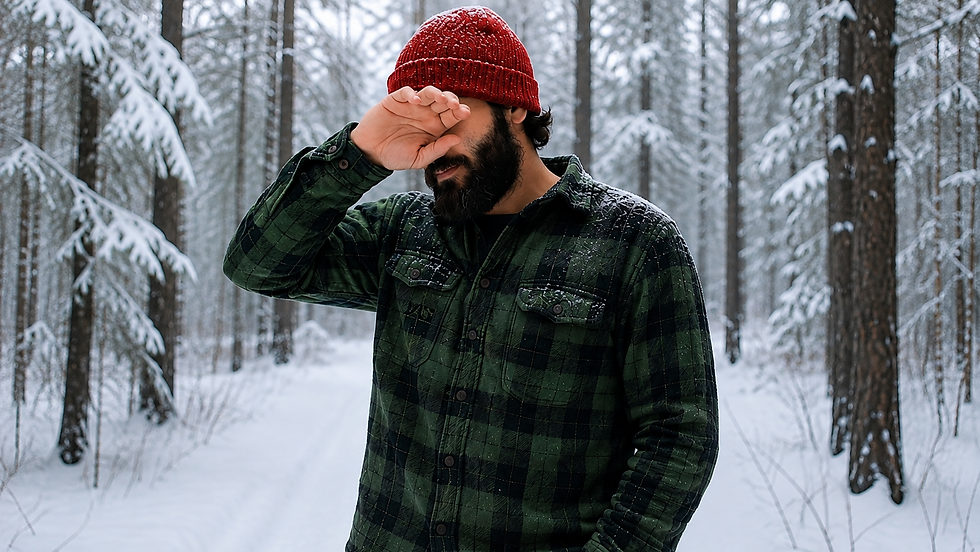
The character was a man wearing a red beanie and green lumberjack flannel, with a snowy forest and cabin setting.
I tested the same basic concept across Luma, Hailuo and Kling to see how well each platform could maintain the character, scene and actions.
At first, I was mainly looking at the generated visuals. But as I continued, I started noticing problems that were not obvious from a single generated clip.

My First Problem: Kling
The prompt didn't do what I asked.
I asked for wood chopping. The character raised his hands and waved instead.

Why this matters for a beginner:
Retry = credits used
Change prompt = another attempt
First result ≠ expected result
The framing was also different.
Some shots placed the character too close to the camera, making the sequence feel less consistent.
Continuity was the bigger challenge
I needed the same:
Character
Clothing
Environment
Camera identity
while changing the action and angle.
Kling has Bind Elements, but a beginner first has to understand what it does and when to use it.
💡 My takeaway: One good clip is easy. Getting multiple clips to feel like one video is the hard part.
Luma Looked Great — But I Didn't Know If It Was Generating
The generated videos were impressive.
Luma produced some of the best-looking shots in my test. The character and snowy environment also looked strong.
But the generation process confused me.
When I clicked Generate, there was not enough clear feedback telling me what was happening.
For a beginner, this creates a simple question:
“Did it start generating, or did my click not work?”
If the user keeps clicking the button because nothing seems to happen, they could potentially trigger unnecessary generations and lose credits.
What I noticed
Good visual quality
Strong character appearance
Good scene quality
Not enough generation-status feedback
Risk of confusion for first-time users
💡 My takeaway: A good generation is not enough. The user should always know whether the video is generating, waiting, completed, or failed.
Hailuo Made Continuity Easier — But the Credit System Was Frustrating
Hailuo was one of the platforms where I found it easier to create connected shots. The character and clothing stayed more consistent when I moved between scenes.

What worked | What changed | What I noticed |
Character continuity | Camera angle | Easier to build scenes |
Clothing consistency | Scene details | Still needed checking |
Multi-shot workflow | Joining shots | Not perfectly smooth |
The problem appeared when I joined the shots
The individual clips looked good, but when I put them together, the transition did not always feel like one continuous video.
💡 My takeaway: Generating consistent shots is only part of the problem. They also need to connect naturally when placed together
Credits became another frustration
🟢 Small test → easy to start
🔴 Need more credits → higher-priced option
⚠️ Beginner problem → difficult to make a small purchase just to continue testing
This gives Hailuo a visual + comparison style, instead of another wall of text.
The Audio Didn't Fit the Video
I needed the narration to match a 15-second video clip.
The problem was that I couldn't get the generated narration to fit that duration naturally. I tried slowing down the voice, but that still didn't give me the timing I needed.
The bigger problem was editing the audio.
I couldn't simply trim the ElevenLabs output the way I wanted. Instead, I had to adjust the video around the narration, which started affecting the continuity of the scenes.
What I ended up doing
🎙️ Generated the narration
⏱️ Tried slowing down the speech
✂️ Couldn't trim the audio to the exact length I needed
🎬 Had to cut/adjust the video instead
🔊 Eventually created three separate audio sections to make the narration clearer and easier to fit

💡 My takeaway
Generating the voice was easy. Making the voice fit the video was the difficult part.
CapCut — Where Everything Had to Come Together
The clips were generated.
The narration was ready.
Now I had to actually turn everything into one video.
The editing sounded simple
Import clips → arrange scenes → add narration → sync audio → add background sound → export.
But this was where the small problems started adding up.
What made editing difficult
Task | Problem I faced |
Joining clips | Transitions didn't always feel natural |
Narration | Had to match the video timing |
Background audio | Needed to fit without overpowering narration |
Scene timing | Some clips were longer or shorter than needed |
Final export | Everything had to be checked again |

💡 My takeaway
Generating the clips was only half the job. The real work was turning separate AI outputs into one watchable video.
What I Learned From Making One Short AI Video with AI Video Generation
I started with one simple idea: generate a short video using AI.
But the actual workflow became:
Prompt → Generate → Retry → Check continuity → Generate narration → Adjust timing → Edit → Sync → Export
The biggest lessons
What I expected | What actually happened |
One prompt would be enough | Multiple generations were needed |
AI would keep the character consistent | Continuity needed constant checking |
Audio would fit automatically | Narration had to be adjusted |
Editing would be quick | Syncing everything took time |
Generating the video was the main task | Managing the whole workflow was harder |
AI can generate impressive individual clips. But creating a complete video is still a workflow problem—continuity, timing, credits, audio and editing all matter.
What I Would Do Differently Next Time
If I Had to Make the Video Again
This time | Next time |
Generated clips separately | Plan the full sequence first |
Retried prompts when results failed | Write more specific prompts |
Adjusted narration after generation | Record narration length earlier |
Checked continuity after generation | Use reference images from the start |
Fixed timing during editing | Plan clip durations before editing |
Moved between several tools | Keep the workflow as simple as possible |
My improved workflow
Plan → Generate → Check → Narrate → Edit → Sync → Export
💡 The goal isn't to generate more. It's to reduce the number of retries and corrections.
Final Takeaway
I started this experiment thinking AI video generation was mostly about writing a good prompt.
After testing Luma, Hailuo and Kling, generating narration with ElevenLabs, and putting everything together in CapCut, I realized the difficult part comes after the generation.
The tools can create impressive clips. The real challenge is turning those clips into one consistent, well-timed video.
For beginners, the biggest lesson is simple:
Don't just test how good an AI tool can generate one clip. Test how well it helps you complete the entire video.
Frequently Asked Questions
Which AI video generators did you test?
I tested Luma, Hailuo and Kling while creating the video.
Was generating the video the hardest part?
No. The harder part was maintaining continuity, managing credits, creating narration, synchronizing audio and editing everything together.
Which problem surprised you the most?
Character and scene continuity. A clip could look good by itself but still feel wrong when placed next to another clip.
Did AI generate the complete video automatically?
No. I still had to move between different tools, adjust timing, generate narration, edit the clips and synchronize the audio.
Why did you use ElevenLabs?
I used ElevenLabs to generate the narration, but matching the narration length with the video required additional editing.
What did you use for final editing?
I used CapCut to combine the generated clips, narration, background audio and other elements into the final video.
What is the biggest lesson for a beginner?
Don't judge an AI video tool only by one impressive clip. The real test is whether you can use it to build a complete, consistent video.
Join the Conversation
Have you tried making a complete video with AI? Share your experience or tell me which AI video generator I should test next.

Thank you for the amazing and informtive blog. You have mentioned the real struggle of AI video generation that every beginners will have. I think this struggle is real for pro AI video generators too.
Very informative and you have included all the painpoints, any end user faces with AI video generation. Great blog.