
Researched Blog Outline with ALwrity AI
- lekhakAI

- Jun 4
- 6 min read
Once ALwrity finishes the research phase, it doesn't just blindly dump a wall of text. Instead, it enters the critical Outline and Scaffolding Phase. This is where small businesses reclaim 70% of their traditional writing time.
Instead of staring at a blinking cursor or trying to figure out how to structure a comprehensive article, the ALwrity dashboard visualizes your entire blog post before a single paragraph is written. It turns content creation from a guessing game into an exact science.
The Micro-Architecture: What Lives Inside an ALwrity Section?
If you click to expand any individual section within the ALwrity outline interface, you quickly realize this is not just a list of generic titles. The platform builds a dense data layer for every single heading to guarantee that the upcoming text is highly relevant, factual, and optimized to rank.
When a small business owner expands a block—like Section 2, "Top AI Writing Tools for Small Businesses"—ALwrity reveals four distinct operational pillars:

Complete Transparency: Total Control Over Word Count and Structure
Most AI writers operate like a black box—you input a prompt, pray, and get a random output. ALwrity flips the script by providing an immediate, clear overview of the article’s architecture.
Right at the top of the dashboard, you see the exact scale of your upcoming post (for example, 6 sections totaling 1,120 words). This ensures your content hits the perfect length for your target industry benchmarks without any unexpected filler text.

Granular Section Management
Every section of your blog is treated as an individual, customizable block. The outline interface allows business owners to fine-tune the article flow effortlessly:
Precise Word Allocation: You can see exactly how much real estate is given to each point, ensuring your core topics get the deep coverage they deserve.
Source Integration: The engine displays exactly how many live web sources are backed into each individual heading, keeping your content grounded in real-world facts.
Easy Reordering: Simple up and down controls allow you to shift sections on the fly, instantly restructuring your narrative logic without messy copy-pasting.
Built-In Rich Media and Link Planning
In 2026, text alone isn't enough to rank on modern search engines. Algorithms and human readers demand rich, interactive content. ALwrity allows you to plan your media strategy directly within the outline panel before drafting begins:
Visual Assets: Toggle image generation options for specific sections to keep reader engagement high.
Data-Driven Layouts: Add charts and visual graphs to sections that require statistical proof or deep-dive analysis.
SEO Linking: Map out internal and external hyperlinks ahead of time to weave a tight web of authority right into the fabric of the text.

The Macro Dashboard Metrics
At the very top of the outline box, the app instantly calculates the total scope of the project so you can plan your content strategy with absolute precision:
Sections and Word Count Tracker: You see the exact number of planned headings (for example, 6 sections) and the projected total word count (1,120 words). This ensures your article hits the sweet spot for search engine optimization without being bloated.
Research to Outline Button: This panel allows you to look backward into the data that built this framework. Clicking it opens up the initial research phase details so you can see exactly why the AI structured the post this way.
Content Intelligence Toggle: A dedicated space that displays semantic insights, search intent mapping, and high-value content gaps that the current outline layout is actively addressing.
ToC and Refine Controls: Right next to your structural layout, the Table of Contents button lets you preview the reader's future navigation layout, while the Refine options let you make global adjustments to the whole document.

The Section Control Row: Customizing Individual Blocks
Every single section heading in ALwrity is equipped with its own dedicated row of production tools. Looking at the individual rows, you can see exactly how much freedom a creator has over each piece of the blog post:
Section Sequence Number: Clear numbering from 1 to 6 shows the exact logical progression of the article, making it easy to see the narrative arc from Introduction to Conclusion.
Target Word Count Allocator: Every heading specifies its own exact length constraint (for example, 180 words for the introduction, 190 words for the body sections). This keeps the AI focused and prevents it from rambling.
Web Source Counter: Displays the precise number of live web sources tied to that specific heading (such as 3 sources for the tool comparison section). This acts as a guarantee that the upcoming text is grounded in real, verifiable online data.
The Edit Pencil: A quick-action edit button next to the heading text that allows you to manually overwrite, tweak, or completely rephrase the section title on the fly.
One-Click Multimedia and SEO Toggles
To ensure the blog post is ready for modern search algorithms that reward rich, engaging layouts, every section features three prominent interactive buttons:
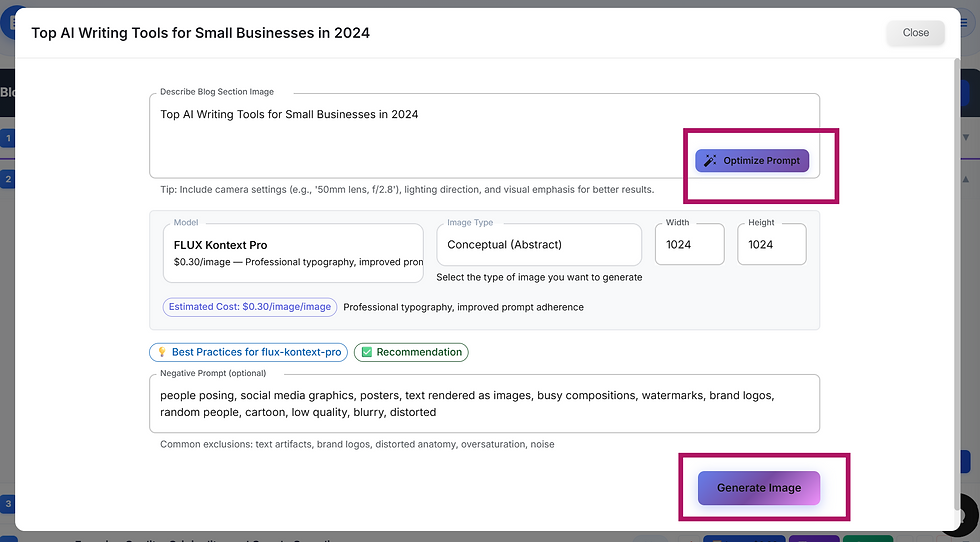
Image Toggle: Shows the estimated generation cost (such as $0.04) and allows you to instantly decide whether that specific section should feature an AI-generated image to break up long walls of text.
Chart Button: A dedicated feature to inject data-driven layouts, statistical graphs, or structural tables directly under that specific heading—perfect for sections that require data proof.
Links Button: Allows you to pre-plan your internal and external SEO hyperlinks right into the fabric of that specific section before the drafting phase even begins.


Data-Driven Layouts: The One-Click Chart Feature
Modern readers and search algorithms quickly grow tired of generic text walls. High-ranking content requires empirical proof, statistics, and structured data layouts. The ALwrity Chart feature allows small businesses to inject visual data blocks seamlessly into any specific section of their blog post.
Instead of manually building spreadsheets or using external graphic design software, creators can click the Chart button on any individual section row.
This commands the AI writer to automatically format upcoming data into a structured layout—such as a comparative table, a metric breakdown, or a decision matrix—tailored precisely to the context of that heading. It ensures your arguments are backed by clear, visual authority the moment the post is generated.


The SEO Control Room: Advanced Internal and External Linking
Building an authoritative blog post in 2026 requires strict attention to outbound and inbound link structures. Search engines treat high-quality links as vital trust signals, assessing your content's Experience, Expertise, Authoritativeness, and Trustworthiness. Clicking the Links button on an ALwrity section row opens up a dedicated hyperlink control panel split into two essential strategies:
1. External Links for Search Engine Trust
The External Links tab acts as a research grounding layer. Within the modal, creators can input an optional website URL or type a precise search query to target across the web. The ALwrity engine then scours the live internet to find authoritative external references. By embedding these credible outbound citations directly into the text fabric of the section, your blog instantly signals to search engines that its claims are verified and trustworthy.
2. The Power of Strategic Internal Linking
The Internal Links tab is where small businesses build real site equity. Instead of trying to remember past blog posts or manually scanning your website for anchor text after publishing, you can pre-plan your internal link architecture directly inside the outline phase.
By defining your internal target paths section by section, the AI writer naturally weaves hyperlinks to your existing service pages, product catalogs, or related case studies into the sentences it drafts. This ensures that a reader navigating your new post is seamlessly guided deeper into your conversion funnel, dramatically improving your site's bounce rates and passing search authority across your entire domain.
Conclusion: Stop Guessing, Start Structuring
The true secret behind cutting content production time by 70% isn't just about faster writing—it is about smarter planning. Most small businesses fail at blogging because they waste hours trying to manually organize information, track down reliable web sources, and figure out an internal linking strategy after a draft is already finished.
The ALwrity AI Blog Writer completely rewrites this workflow. By turning the outline phase into an interactive control panel, it allows you to engineer your word count, verify your facts, design data tables, and map out your internal site authority before a single paragraph is even drafted.
If you are ready to stop staring at a blank cursor and start publishing data-driven, search-optimized content, it is time to move past legacy manual writing tools. Try the ALwrity AI Blog Writer soon and experience how a structured, research-backed blueprint can transform your business's digital footprint.


Comments