
How to Write a YouTube Channel Description + 5 Free Templates

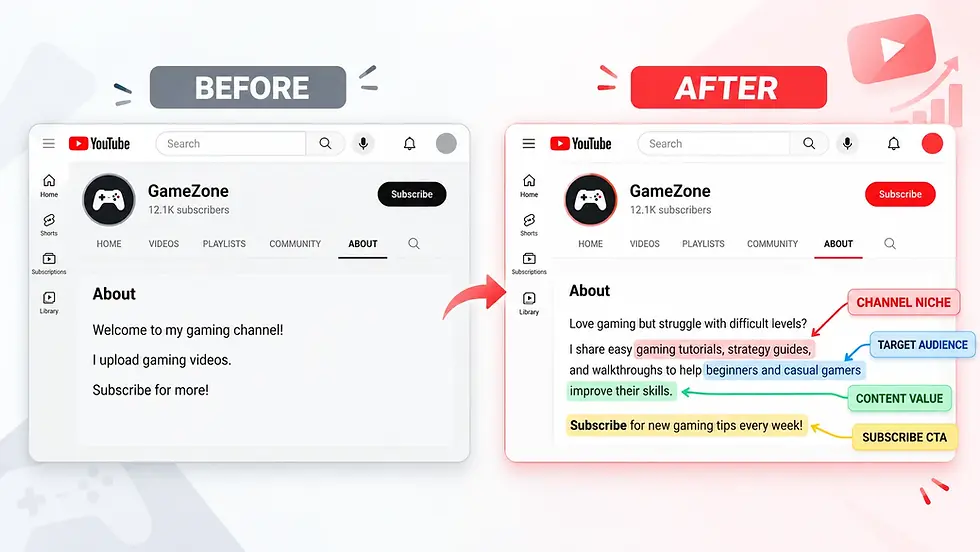
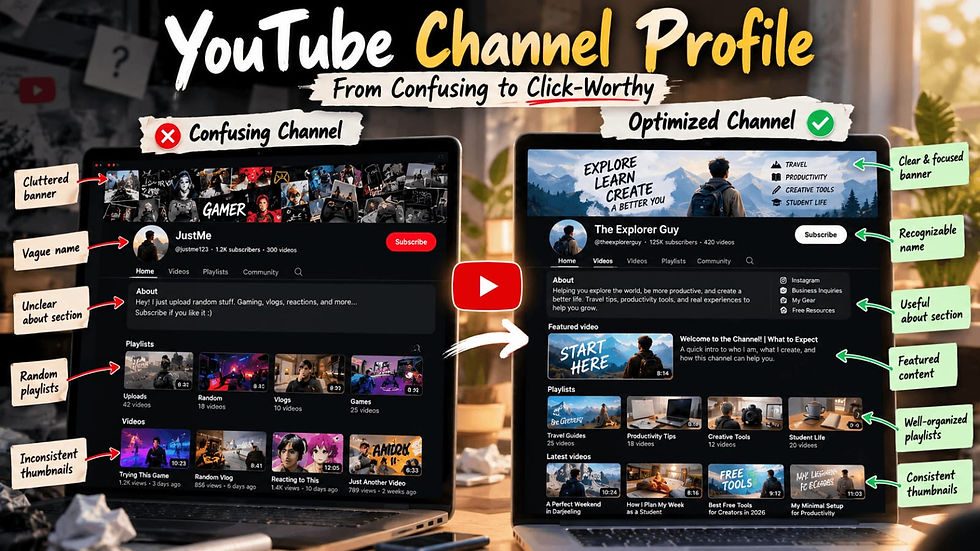
You’ve spent hours planning video ideas, optimizing titles, and designing eye-catching thumbnails. But when was the last time you reviewed your YouTube channel description?
It’s easy to overlook your channel’s About section. After all, viewers come for the videos, right? But when someone discovers your content and wants to know what else you offer, your channel description can help them decide whether to stick around.
A well-written YouTube channel description does three important things:
Identifies your audience: Makes it clear who your content is for.
Sets expectations: Tells viewers what topics you cover, what value they'll get, and how often you upload, if you follow a schedule.
Encourages action: Gives visitors a reason to subscribe, explore your videos, or visit your website.
And the good news? You don’t need to be an SEO expert to write a description that communicates your channel’s value and encourages viewers to take the next step.
In this guide, you’ll learn how to write a YouTube channel description using simple About section formulas, natural keyword placement, and effective calls to action (CTAs). You’ll also find ready-to-use YouTube channel description templates for different niches, along with before-and-after examples to help you improve your own description.
What Is a YouTube Channel Description?
A YouTube channel description, also known as your YouTube About section, is a short overview that explains what your channel is about, who your videos are for, and what viewers can expect from your content.
Think of it as your channel's elevator pitch. When someone visits your channel for the first time, they should quickly understand:
What you create: The topics, video formats, or niche you focus on.
Who it's for: The audience that will find your content useful.
Why they should subscribe: The value your videos offer and what makes your channel worth following.
Example: Generic vs. Value-Driven YouTube Descriptions
Let's look at how a simple change can make a channel description more useful.
❌ Generic description:
"I make fitness videos."
✅ Improved description:
"I share beginner-friendly home workouts, quick fitness routines, and practical nutrition tips to help busy professionals stay active without a gym membership."
Notice the difference?
The improved description clearly communicates:
Niche: Home workouts and fitness routines.
Target audience: Busy professionals.
Value: Staying active without needing a gym membership.
Instead of making visitors guess what the channel offers, it gives them a clear reason to explore the content.
What Makes a YouTube Channel Description High-Converting?
Imagine visiting two YouTube channels about travel.
Generic Description:
"I love travelling and sharing my adventures. Subscribe to my channel!"
High-Converting Description:
"Planning your first international trip? I share budget-friendly itineraries, travel tips, and destination guides to help you explore more without overspending. Subscribe for new travel guides every Tuesday!"
Which one would make you want to explore more?
The second description doesn't just introduce the creator. It explains what viewers can gain by following the channel. The same principle applies to video titles. Here's our guide to writing high- CTR YouTube titles.
That's what makes a high-converting YouTube channel description different from a basic introduction. It gives visitors a clear reason to explore your content and encourages them to take the next step.
Here are three elements that make a description more effective.

1. Identify Your Target Audience
Your YouTube About section should help visitors quickly understand whether your content is relevant to them.
Broad: "I share cooking videos."
Audience-Focused: "I share quick vegetarian recipes for busy college students who want affordable, homemade meals."
The second example speaks directly to a specific audience rather than trying to appeal to everyone.
Quick tip: Before writing, think about your ideal viewer. What are they trying to learn, solve, or achieve?
2. Communicate Content Value, Not Just Topics
Don't just list the topics you cover. Explain how your videos can help viewers.
Basic: "I upload videos about personal finance."
Value-Driven: "I share simple budgeting tips and money-saving strategies to help beginners manage their finances with confidence."
The second description gives visitors a clearer reason to explore the channel because it focuses on what they can gain.
3. Include One Clear Call-to-Action (CTA)
Here's something many creators overlook: not every YouTube channel has the same goal.
Some creators want more subscribers. Others want viewers to explore their playlists, while businesses may want visitors to visit their websites.
Instead of asking people to subscribe, follow multiple social accounts, visit your website, and watch several playlists at once, focus on one primary action.
Channel Goal | Example Call-to-Action (CTA) |
Gain Subscribers | "Subscribe for new beginner-friendly tutorials every week." |
Encourage More Video Views | "Start with my Beginner Essentials playlist to learn the basics." |
Drive Website Traffic | "Download my free resource guide using the website link on my channel page." |
Build Community | "Share your questions in the comments on my latest video!" |
The right CTA depends on what you want visitors to do after discovering your channel. We'll explore how to choose and write effective CTAs in more detail later in this guide.
A Quick 3-Step YouTube Channel Description Framework
Before writing your description, try completing these three sentences:
My channel is for: [Target Audience]
My videos help viewers: [Core Value or Outcome]
The main action I want visitors to take is: [Primary CTA]
For example, a beginner-friendly cooking channel might answer:
Audience: College students living away from home.
Value: Learning to prepare quick, affordable meals.
CTA: Subscribe for easy weekly recipes.
Once you've answered these questions, you'll have a clearer idea of what your description needs to communicate.
How to Write Your YouTube About Section (With an Example)
Writing a compelling YouTube channel description isn't about listing facts—it's about telling a viewer why they should stay.
Simple formula: Who your channel is for + What content you create + How it helps viewers + One clear CTA.
Follow this simple 3-step process to draft yours:
1. Ditch the Generic Opening
Avoid weak intros like "Welcome to my channel!" or "I love making videos." They waste space and tell viewers nothing about your content's value.
2. Combine the Core 4 (Full Example)
Combine your audience, content, value, and call to action into a single flow:
Example: Beginner Photography Channel"New to photography? I share beginner-friendly camera tutorials and editing walkthroughs to help you take better photos without buying expensive gear.Subscribe for new tutorials every Friday!"
3. Adapt It to Your Niche
Keep the structure, but swap the details to fit your topic:
Cooking: "Looking for quick, cheap meals? I share easy vegetarian recipes and budget meal preps for busy students."
Gaming: "Struggling with tough levels? I share beginner walkthroughs and strategies to help you level up fast."
Pro Tip: Read your draft aloud. If it sounds robotic or pushy, simplify it.
🚀 Ready to add it to YouTube? Open YouTube Studio, go to Customization → Profile, edit your channel description, and publish your changes.
How to Add Keywords Naturally to Your YouTube Channel Description
Keywords are the words and phrases viewers use when searching for content on YouTube. Including relevant terms in your YouTube channel description helps communicate your niche and gives YouTube additional context about your content.
However, adding too many keywords can make your description repetitive and difficult to read. Here's how to optimize your YouTube About section without sounding robotic.
1. Choose One Main Keyword and Related Terms
Start with one main phrase that describes your channel's niche, along with a few related terms.
For example, if you run a photography channel:
Keyword Type | Example |
Main Keyword | Beginner photography |
Related Terms | Camera tutorials, photo editing guides, photography tips |
You don't need to include every phrase. Choose the ones that accurately describe your content. For more tips, explore our YouTube video description guide.
Quick tip: Type your main topic into YouTube's search bar and explore the autocomplete suggestions for relevant keyword ideas.
2. Introduce Your Main Keyword Early
Try to mention your channel's main topic naturally in the opening sentence. This helps first-time visitors quickly understand what your content is about.
❌ Vague:
"Welcome! I love taking pictures and sharing my experiences."
✅ More specific:
"Interested in beginner photography? I share practical camera tutorials and editing guides to help you take better photos."
The second example introduces the channel's niche while explaining what viewers can expect.
3. Avoid Keyword Stuffing
Repeating the same keyword unnecessarily makes your description harder to read.
❌ Keyword-stuffed:
"Welcome to my beginner photography channel for beginner photography tips and beginner photography guides."
✅ Natural flow:
"Learning photography from scratch? I share simple camera tutorials, practical shooting tips, and editing guides to help beginners take better photos."
📌 Remember: Write for your viewers first. Keywords should fit naturally into your description, not dominate it. You can also explore our YouTube tag generator guide.
YouTube Channel Description Templates for Different Niches
Not sure what to write in your YouTube About section?
Here are five ready-to-use YouTube channel description templates for different niches. Simply replace the details in [brackets] with your own information.
1. Educational YouTube Channel Description Template 🎓
Best for: Tutorials, study tips, and educational content.
Want to learn [subject] without feeling overwhelmed? I share beginner-friendly tutorials, practical lessons, and useful tips to help [target audience] understand [subject]. From [topic 1] to [topic 2], you'll find simple explanations you can actually use. Subscribe for new [subject] tutorials every [upload day]!
2. Gaming YouTube Channel Description Template 🎮
Best for: Gaming walkthroughs, reviews, and strategies.
Love playing [game name]? I share gameplay walkthroughs, beginner-friendly strategies, and useful tips to help you improve your skills. Whether you're struggling with [challenge] or exploring [game feature], there's something here for you. Subscribe for new gaming videos every [upload day]!
3. Travel YouTube Channel Description Template ✈️
Best for: Travel vloggers, destination guides, and budget travellers.
Planning a trip to [destination]? I share budget-friendly itineraries, local recommendations, and practical travel tips to help you explore [destination] with confidence. Discover hidden gems, must-visit places, and experiences worth adding to your itinerary. Start with my [playlist name] playlist!
4. Business YouTube Channel Description Template 💼
Best for: Entrepreneurs, freelancers, and small businesses.
Looking to grow your [business type]? I share practical strategies, marketing tips, and real-world examples to help [target audience] achieve [specific goal]. Learn about [topic 1], [topic 2], and [topic 3] without complicated explanations. Get my free [resource name] through the website link on my channel!
5. Faceless YouTube Channel Description Template 🎬
Best for: Storytelling, documentaries, and educational explainers.
Curious about [main topic]? Explore fascinating stories, interesting facts, and easy-to-follow explanations about [specific subjects]. From [topic 1] to [topic 2], every video brings something new to discover. Subscribe for new [main topic] videos every [upload day]!
How to Customize These Templates
Before publishing, replace the placeholders with your channel's actual topics, audience, and goals.
For example: Instead of writing "I share tutorials about [subject]," write "I share beginner-friendly Excel tutorials to help students and professionals improve their spreadsheet skills."
Quick tip: Choose a template that matches your niche, personalize the opening, and make sure your CTA gives viewers one clear next step.
Remember, the best YouTube channel description sounds like you, not a copied template.
Choose the Right Call-to-Action (CTA) for Your YouTube Channel Description
A great YouTube channel description doesn't just inform—it encourages viewers to take action. However, asking people to subscribe, follow your Instagram, visit your website, and watch multiple playlists all at once can feel overwhelming.
Instead, choose one primary goal and match your CTA to what you want viewers to do next.
Channel Goal | CTA Example |
Gain Subscribers | "Subscribe for new beginner-friendly tutorials every Friday!" |
Get More Video Views | "New here? Start with my Beginner Photography playlist on my channel!" |
Drive Website Traffic | "Download my free content planner using the website link on my channel!" |
3 Rules for an Effective YouTube CTA
Be Specific: Tell viewers exactly what to do instead of simply saying "Check out my channel."
Highlight the Benefit: Explain what they'll gain, whether it's free templates, useful tutorials, or weekly guides.
Focus on One Action: Prioritize the action that matters most to your channel's current goal.
Pro Tip: Ask yourself: "If someone takes just one action after reading my About section, what should it be?" Use that answer to guide your CTA.
8. Common YouTube Channel Description Mistakes to Avoid
Even a well-written YouTube channel description can lose its impact because of a few small mistakes. Before publishing yours, check whether you're making any of these:
1. Writing Too Much About Yourself
Your About section shouldn't read like a personal biography. Viewers want to know what they'll get from your channel.
❌ Instead of: "I've loved cooking since childhood, and starting this channel has always been my dream."
✅ Try: "Discover easy vegetarian recipes and budget-friendly meal ideas you can make in under 30 minutes."
You can still share your personality, but make sure viewers understand your content first.
2. Making Promises You Can't Keep
Writing "New videos every day!" might sound exciting, but what happens if you only upload twice a month?
Avoid promising a posting schedule you can't maintain.
Better approach: Use "Subscribe for more beginner-friendly tutorials" if you don't have a fixed schedule.
3. Using Vague or Overused Phrases
Expressions like "Amazing content," "Best videos," or "Something for everyone" don't explain what makes your channel different.
❌ Vague: "I make amazing videos about technology."
✅ Specific: "I review budget smartphones and explain their features to help first-time buyers choose the right device."
4. Forgetting to Update Your Description
Your channel might have started with gaming tutorials but gradually shifted toward technology reviews. If your About section still describes your old content, new visitors could get confused.
Quick fix: Review your description whenever your channel's content, audience, or main goal changes.
5. Adding Links Without Context
Simply writing "Visit my website" doesn't tell viewers why they should leave YouTube.
Instead, explain what they'll find there.
❌ Generic: "Check out my website."
✅ Better: "Find the free recipe collection through the website link on my channel."
The easier you make it for viewers to understand your content and next steps, the more useful your description becomes.
9. YouTube Channel Description Checklist: Before You Publish
Finished writing your YouTube channel description? Before publishing it, use this quick self-assessment to find out whether you've covered the essentials and what you might need to improve.
What's next? If your assessment highlighted a few areas for improvement, go back to the relevant tips and examples in this guide and update your description. Once you've made the changes, try the assessment again to see how many essentials you've covered.
10. FAQs About YouTube Channel Descriptions
1. How long should a YouTube channel description be?
YouTube allows up to 1,000 characters in a channel description, but you don't need to use all of them.
Focus on explaining what your channel offers, who it's for, and why someone should subscribe. A shorter, well-written description is usually more useful than a lengthy one filled with unnecessary details.
2. Can I change my YouTube channel description after publishing it?
Yes! You can update your channel description whenever you want through YouTube Studio.
In fact, it's worth reviewing your description when you change your content niche, start targeting a different audience, or introduce something new to your channel.
3. Should I include hashtags in my YouTube channel description?
Hashtags aren't necessary for writing an effective channel description.
Instead of adding multiple hashtags, focus on using relevant keywords naturally within your sentences. Your description should help visitors understand your channel rather than look like a collection of search terms.
4. Can a YouTube channel description help increase subscribers?
A clear description can help visitors understand what your channel offers and decide whether they want to subscribe.
However, a description alone won't guarantee more subscribers. Your videos, thumbnails, titles, and overall content quality also influence whether viewers choose to follow your channel.
Turn Your YouTube Channel Description Into a Strong First Impression
Your YouTube channel description might seem like a small part of your channel, but it helps new visitors understand what you create and whether your content is right for them.
You don't need complicated words or a description packed with keywords. Focus on explaining what your channel offers, who it's for, and what viewers should do next.
And remember, your description doesn't have to be perfect on the first attempt. As your channel grows and your content changes, you can always revisit and improve it.
Before you leave: If you haven't already, try the YouTube Channel Description Self-Assessment Tool above to identify anything you might have missed.

Comments