
Create a LinkedIn Headline That Helps You Get Hired

Now that you've optimized your LinkedIn profile and chosen the right profile photo and banner, it's time to focus on another important part of your profile which is your LinkedIn headline.
Your headline is one of the first things recruiters see after your name. A clear and well-written headline tells them who you are, what you do, and why they should visit your profile. In this guide, you'll learn how to write a LinkedIn headline that grabs attention and helps you get hired.

Table Of Content
What Is a LinkedIn Headline?
A LinkedIn headline is the short text that appears right below your name on your LinkedIn profile. It tells people who you are, what you do, or what type of job you're looking for.
Think of it as your first introduction. A good headline helps recruiters quickly understand your profile and encourages them to click and learn more about you.
Example:
Software Engineer | Java Developer | Open to Work
Digital Marketing Specialist | SEO Expert | Helping Brands Grow
Computer Science Student | Aspiring Data Analyst | Open to Opportunities
Why Your LinkedIn Headline Matters
Your LinkedIn headline is one of the first things recruiters and hiring managers notice. It appears in LinkedIn search results, connection requests, job applications, and comments. A strong headline can make people curious to visit your profile.
A clear and keyword-rich headline also helps recruiters understand your skills and profession quickly. Instead of using only your job title, explain what you do and the value you bring. This can improve your profile visibility and increase your chances of getting noticed.
How Recruiters Use LinkedIn Headlines
Recruiters often search LinkedIn using keywords like "Software Developer," "Digital Marketer," or "Graphic Designer." If your headline includes the right keywords, your profile is more likely to appear in their search results.
Even if your profile appears in the search, recruiters usually decide within a few seconds whether to click on it. A clear and professional headline gives them a good reason to learn more about you.
Looking for more AI writing tools? Explore ALwrity AI Writers to create blogs, emails, social media posts, product descriptions, and more.
How to Write a LinkedIn Headline That Gets You Hired
Writing a good LinkedIn headline is simple. You don't need fancy words or long sentences. A strong headline clearly tells recruiters who you are, what you do, and what skills you have.
Here are five simple tips to write a better LinkedIn headline.
1. Add Your Job Title or Career Goal
Start with your current job title or the role you're looking for.
Example: Software Engineer | Digital Marketing Executive | Aspiring Data Analyst
2. Include Your Key Skills
Add 2–3 important skills that match your profession.
Example: SEO | Java | Content Writing
3. Show What You Do
Tell people how you help others or what you specialize in.
Example: Helping Businesses Grow with SEO
4. Use Relevant Keywords
Include keywords recruiters are likely to search for to improve your profile visibility.
5. Keep It Short and Clear
Use simple words and avoid long or confusing headlines.

LinkedIn Headline Formula You Can Use
Writing a LinkedIn headline is easier than it looks. You don't have to think too much or use difficult words. Just follow this simple formula, and you'll be able to create a clear and professional headline in just a few minutes.
Formula
Job Title + Key Skills + Value You Provide
Example:
Software Engineer | Java Developer | Building Scalable Applications
Digital Marketing Specialist | SEO & Content Marketing | Helping Brands Grow Online
Graphic Designer | UI/UX Designer | Creating User-Friendly Designs
Computer Science Student | Python | Open to Internship Opportunities
Tip: Keep your headline simple, relevant, and focused on your profession. Avoid adding too many keywords or buzzwords.
LinkedIn Headline Examples for Different Professions
Not sure what to write? Don't worry. Looking at examples is one of the easiest ways to create your own LinkedIn headline. Here are a few simple headline ideas for different professions.
1. Students
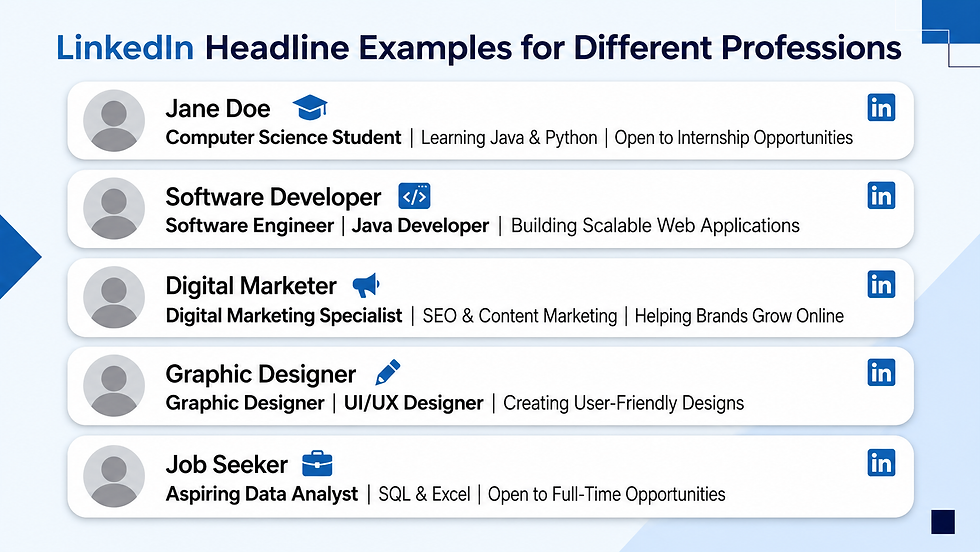
Computer Science Student | Learning Java & Python | Open to Internship Opportunities
2. Software Developers
Software Engineer | Java Developer | Building Scalable Web Applications
3. Digital Marketers
Digital Marketing Specialist | SEO & Content Marketing | Helping Brands Grow Online
4. Graphic Designers
Graphic Designer | UI/UX Designer | Creating User-Friendly Designs
5. Job Seekers & Freshers
Aspiring Data Analyst | SQL & Excel | Open to Full-Time Opportunities
Tip: Use these examples as inspiration. Update your headline with your own job title, skills, and career goals to make it unique.
Common LinkedIn Headline Mistakes to Avoid
Your LinkedIn headline is the first thing many recruiters notice. Even a small mistake can make your profile look less professional. Here are some common mistakes you should avoid.
1. Using Only Your Job Title
A headline like "Software Engineer" doesn't tell people much. Add your skills or the value you provide to make it more interesting.
2. Using Too Many Buzzwords
Words like "Hardworking," "Passionate," or "Dynamic" don't explain what you actually do. Be specific instead.
3. Writing a Very Long Headline
A long headline is difficult to read. Keep it short, clear, and easy to understand.
4. Not Using Relevant Keywords
Recruiters search using keywords. If your headline doesn't include your profession or skills, your profile may be harder to find.
5. Leaving Your Default Headline
If your headline only shows your current job title or is left unchanged, you're missing an opportunity to stand out.

Tip: A simple, clear, and keyword-rich headline is always better than a long or confusing one.
Free AI Tools to Generate a Better LinkedIn Headline
Creating a good LinkedIn headline doesn't have to be difficult. If you're running out of ideas or want to save time, AI tools can help you write a professional headline in just a few clicks.
Here are some free tools you can use:
Resume Worded LinkedIn Headline Generator – Dedicated AI tool that generates keyword-rich LinkedIn headlines based on your profession and skills. It also explains why a strong headline improves profile visibility.
Grammarly AI LinkedIn Headline Generator – Generate professional LinkedIn headlines by entering your job title, industry, skills, and preferred tone. It creates polished, recruiter-friendly headline suggestions.
Buffer LinkedIn Headline Generator – Create personalized LinkedIn headlines by providing your role, skills, target audience, and writing style.
Microsoft Copilot – Brainstorm, rewrite, and refine LinkedIn headlines based on your skills, experience, and career goals.

Final Thoughts
Your LinkedIn headline is a small part of your profile, but it can make a big difference. A clear and professional headline helps recruiters understand who you are and encourages them to learn more about you.
Now it's your turn! Update your LinkedIn headline using the tips from this guide and make your profile stand out.
Once you've created your LinkedIn headline, you can use AI Blog Writer and AI Paragraph Rewriter to create professional LinkedIn posts and improve your writing.
Continue Building Your LinkedIn Profile with Us
Ready to make your LinkedIn profile even stronger? Here are the next guides to help you stand out:
Learn how to create your LinkedIn account, connect with recruiters, build your network, and apply for jobs effectively.
Improve your headline, About section, skills, experience, and other important profile sections.
Create a strong first impression with a professional profile photo and a banner that reflects your personal brand.
Learn how to write a clear, keyword-rich LinkedIn headline that grabs recruiters' attention and encourages them to visit your profile.


Comments