
YouTube Handle Ideas: How to Choose Name That Builds Your Brand [60 Examples]


To choose the perfect YouTube handle, pick a name that is unique, easy to spell, and under 30 characters. Align it with your channel's niche or use your personal name for branding. Avoid complex numbers or symbols, and ensure the handle is available across major social platforms for brand consistency.
You’ve mapped out your content strategy and planned your first video, but you are stuck on a critical step: choosing your YouTube handle.
Finding the right handle isn’t just about picking a catchy username. It is about creating a distinct digital identity that your audience can easily recognize, remember, and search for. If your preferred name is taken, or you are struggling to balance creativity with brand strategy, this guide will help.
Below, we break down actionable naming strategies, explore 60 real-world examples across different niches, and cover the essential rules for keeping your brand consistent across the web.
YouTube Handle vs Channel Name: What's the Difference?

While your YouTube channel name and handle work together to build your brand, they serve entirely different purposes. For instance, if you launch a travel channel, your identity details might look like this:
Channel Name: Wandering With Mia
YouTube Handle: @WanderingWithMia (which creates the URL: youtube.com/@WanderingWithMia)
If another creator uses the same channel name, your unique handle ensures viewers can always find the correct account in comments, mentions, and search results.
Feature | YouTube Channel Name | YouTube Handle |
Uniqueness | Does not have to be unique | Must be 100% unique |
Formatting | Text only, no special symbols required | Always starts with the @ symbol |
Purpose | Your public display name | Your digital ID and custom channel URL |
Visibility | Appears primarily on your channel profile | Appears in search, comments, Shorts, and mentions |
Note: Your handle is just one piece of your visual brand. To complete your setup, read our comprehensive guide on optimizing your YouTube channel profile.
How to Choose a YouTube Handle That Fits Your Channel
Choosing the right handle can feel overwhelming, but keeping it practical ensures long-term branding success. Follow these five core rules to pick the perfect name:
1. Reflect Your Content (But Don't Box Yourself In)
Your handle should give new viewers an immediate hint about your niche. However, avoid being so specific that you can’t pivot your content later.
Good: @EverydayBites (Cooking) or @TechMadeSimple (Technology)
⚠️ Danger Zone: @BudgetPhonesOnly (Restricts you if you want to review laptops or smartwatches later)
2. Keep It Short and Memorable
Your handle needs to pass the "word-of-mouth" test. If a subscriber tells a friend about your channel, that friend should be able to type it in easily later without confusion.
Good: @TravelWithMia
❌ Bad: @TheOfficialTravelAdventures2026
3. Prioritise Easy Spelling and Searchability
Avoid "creative" spellings, intentional typos, or hard-to-pronounce words. If people struggle to spell your name, they won't find your channel.
Good: @CreativeCorner
❌ Bad: @KreativKornerX
4. Build for Your Long-Term Brand
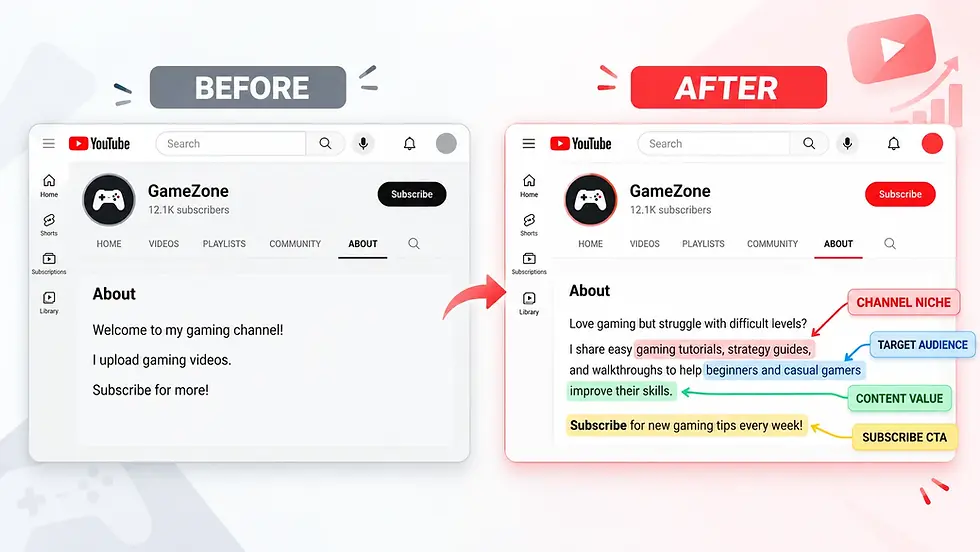
Decide early if you want a personal brand (using your real name) or a faceless/thematic brand (using a business or niche name). Once you settle on your handle strategy, make sure your channel layout aligns with it. For maximum impact, ensure your YouTube channel description clearly reinforces this branding.
5. Check Availability (and Have a Backup Plan)
Before getting attached to a handle, check its availability directly on YouTube. If your ideal choice is already taken, add a meaningful industry word instead of throwing random numbers at the end.
Preferred (Taken): @DailyBites
Smart Alternative: @DailyBitesKitchen
❌ Lazy Alternative: @DailyBites98427
(Note: Handle examples used above are for illustrative purposes and actual availability on YouTube may vary.)
A Quick Exercise Before You Decide
60 YouTube Handle Ideas for Different Types of Creators
Finding an original handle can be tough. Use these 60 example handles across six popular categories as inspiration to jumpstart your own channel identity.
1. YouTube Handle Ideas for Gaming Channels
Examples | Best For |
@PixelQuestDaily | Gaming adventures and walkthroughs |
@RespawnWithMe | Casual gaming and live streams |
@LevelUpLegends | Gaming tutorials and challenges |
@TheGamingCheckpoint | Game reviews and commentary |
@PixelRushGaming | Fast-paced gaming content |
@BeyondTheConsole | Gaming discussions and news |
@QuestModeOn | RPG and adventure games |
@NextLevelPlays | Competitive gaming |
@ControllerChronicles | Gaming stories and experiences |
@TheFinalRespawn | Multiplayer gaming |
💡 Naming Tip: Avoid using a specific game title (like Fortnite or Minecraft) so you don't box yourself in later.
2. YouTube Handle Ideas for Travel Channels
Examples | Best For |
@MilesWithMia | Personal travel vlogs |
@BeyondTheMap | Exploring unusual destinations |
@WanderingWeekends | Weekend trips |
@PassportDiaries | International travel |
@TheLocalExplorer | Local travel guides |
@RoamAndRecord | Travel filmmaking |
@HiddenRouteStories | Lesser-known destinations |
@JourneyWithJoy | Lifestyle and travel |
@TheBudgetWanderer | Budget travel |
@PostcardsAndPaths | Travel storytelling |
💡 Naming Tip: If you focus on a single country now, pick a broader name so you can expand internationally later.
3. YouTube Handle Ideas for Beauty and Lifestyle Channels
Examples | Best For |
@GlowWithGrace | Skincare and beauty tips |
@TheEverydayGlow | Everyday beauty routines |
@SimplyStyled | Fashion and styling |
@BeautyBeyondBasics | Makeup tutorials |
@TheSelfCareEdit | Wellness and self-care |
@BlushAndBeyond | Makeup reviews |
@MinimalGlowUp | Minimalist beauty |
@StyleWithSophie | Personal styling |
@TheBeautyNotebook | Product reviews and recommendations |
@EverydayElegance | Fashion and lifestyle |
💡 Naming Tip: Including your first name makes a creator-led brand feel instantly more personal and authentic.
4. YouTube Handle Ideas for Educational Channels
Examples | Best for |
@TheCuriousClassroom | Deep-dive explainers |
@StudySmarterDaily | Productivity hacks |
@KnowledgeInMinutes | Micro-learning/Shorts |
@TheLearningLab | Science experiments |
@SimplyExplained | Complex topics made easy |
@BrainBoostAcademy | Student tips |
@TheStudyCorner | Academic help |
@CuriosityUnlocked | General knowledge facts |
@EverydayLearningHub | Resourcing and tutorials |
@LearnWithLeo | General education |
💡 Naming Tip: Use power words like simple, minutes, or unlocked to show viewers exactly how you teach.
5. YouTube Handle Ideas for Food Channels
Examples | Best for |
@TheRecipeNotebook | Step-by-step tutorials |
@SpiceAndStories | Cultural food history |
@QuickKitchenFix | Meal prep and shortcuts |
@TheHungryExplorer | Restaurant reviews |
@HomeCookDiaries | Amateur cooking vlogs |
@TheCozyKitchen | Comfort food |
@BitesOnABudget | Affordable eating |
@SimplyDeliciousDays | Family baking |
@FlavoursWithMia | Signature recipes |
@EverydayBites | Quick home meals |
💡 Naming Tip: Avoid specifying a single ingredient or style (like "Keto" or "Vegan") unless you are 100% sure you won't change your diet later.
6. YouTube Handle Ideas for Tech Channels
Examples | Best for |
@EverydayTechReviews | Consumer electronics |
@TheDigitalDesk | Workspace setups and tech news |
@GadgetExplained | Deep-dive product features |
@FutureTechFiles | AI and emerging tech |
@TheTechNotebook | Software tips and tricks |
@SmartTechDaily | Daily news updates |
@BeyondTheGadget | Teardowns and hardware debates |
@DigitalWithDan | Independent tech creators |
@TechWithoutJargon | Non-technical audiences |
@TechMadeSimple | Beginner tutorials |
💡 Naming Tip: Focus on a broad theme rather than a specific device family (like "iPhone") to stay relevant as tech evolves.
(Note: These handles are for creative inspiration only; their live availability on YouTube has not been verified.)
The Formula Behind Winning Handles
If you want to build your own handle from scratch, successful creators generally mix and match these five formulas:
Niche + Personality: @GlowWithGrace
Action + Topic: @RoamAndRecord
Topic + Benefit: @TechMadeSimple
Personal Name + Niche: @MilesWithMia
Creative Phrase: @BeyondTheMap
Official YouTube Handle Rules
Before finalizing your choice, ensure it complies with YouTube's strict formatting and character guidelines:
Length Constraint: Must be between 3 and 30 characters.
Allowed Characters: Standard alphanumeric letters, numbers, underscores (_), hyphens (-), periods (.), and middle dots (·).
Spacing & Placement: No spaces allowed. Special characters cannot start or end the handle.
YouTube Handle Ideas | ExampleValid Format? | Why / Why Not |
@TravelWithMia | ✅ Yes | Standard alphanumeric string. |
@Travel_With_Mia | ✅ Yes | Uses correctly placed underscores. |
@TravelWithMia_ | ❌ No | Cannot end with a special character. |
@Travel With Mia | ❌ No | Spaces are strictly forbidden. |
@Travel#WithMia | ❌ No | Contains an unapproved symbol (#). |
For complete details, refer to YouTube's official handle guidelines.
Why Your YouTube Handle Should Match Your Social Media Usernames
If a viewer discovers your content on YouTube and wants to follow you on Instagram or TikTok, a mismatched username creates an unnecessary barrier. Cross-platform consistency ensures your growing audience can effortlessly find, tag, and mention your brand anywhere on the web.
3 Steps to Cross-Platform Consistency
Audit Before You Commit: Before finalizing your YouTube handle, run a quick availability check across platforms like Instagram, TikTok, Pinterest, and X (Twitter).
Keep Handle Variations Minimal: If your exact handle is taken on a secondary platform, use a unified modifier rather than switching to a completely new name.
Unified Strategy: @MiaTravels (YouTube) ➔ @MiaTravelsOfficial (Instagram)
❌ Broken Strategy: @MiaTravels (YouTube) ➔ @WanderingMia99 (Instagram)
Anchor Your Visual Identity: If you must use slight handle variations, keep your profile picture, color palette, and core brand assets identical across all networks so viewers instantly recognize your page.
Does Username Consistency Improve SEO?
A matching username across platforms is not a direct algorithmic ranking signal for the YouTube algorithm.
It heavily influences off-platform SEO. Search engine algorithms crawl cross-platform data; having identical handles increases the likelihood that your external social media profiles, personal website, and YouTube channel will dominate the entire first page of Google when someone searches for your brand name.
Managing cross-platform branding while staying consistent with your upload schedule can be challenging. If you are balancing content creation with a busy schedule, check out our practical guide on how to manage a YouTube channel while working or studying.
How to Change Your YouTube Handle Without Confusing Your Audience
If your content has evolved or your old username no longer fits your brand, you can update your handle without creating a new channel.
YouTube lets you change your handle twice within a 14-day window. When you make a change, YouTube holds your old handle for 14 days. This prevents anyone else from claiming it immediately and gives you a two-week safety net to switch back if you change your mind.
Step-by-Step Update Guide
🖥️ On Desktop (YouTube Studio): Sign in and click Customization in the left sidebar. Select the Basic Info tab, enter your new username in the Handle field, and click Publish.
📱 On Mobile (YouTube App): Tap your Profile Picture at the bottom right, select View Channel, and tap the Edit (Pencil) icon. Tap the pencil icon next to your current handle, type your new one, and hit Save.
Crucial Post-Change Checklist
Update Your Web Footprint: Your old handle-based URL (://youtube.com) will completely stop redirecting after YouTube's 14-day grace period expires. You must immediately update the links in your website footers, email signatures, and external social media bios.
Inform Your Audience: Announce the change via a YouTube Community tab text post or a quick shoutout in your next video so long-time viewers recognize your comments under the new name.
Verify Cross-Platform Handles: Make sure your new handle matches or closely mirrors your handles on platforms like TikTok or Instagram to ensure consistent cross-platform discoverability.
Frequently Asked Questions About YouTube Handles
1. Does changing my YouTube handle affect my subscribers or views?
No. Changing your handle is purely a cosmetic update to your digital address. It will not delete your subscriber count, wipe out video watch hours, or alter your search performance.
2. Should I use my real name or a brand name as my handle?
Choose a personal handle (e.g., @DanSmith) if you want to build a personal brand focused on lifestyle vlogging or public speaking. Choose a thematic brand handle (e.g., @TechExplored) if you run a faceless channel or want to scale your channel into an independent media company later.
3. Do YouTube handles affect channel SEO?
They are not a primary ranking signal for discoverability within the standard algorithm. However, a clean, direct, and keyword-friendly handle makes your channel much easier to locate when viewers search for your brand name directly in the main search bar.
Choosing a YouTube handle is a personal decision, and every creator has different priorities. What matters most to you when picking a username for your channel? Share your opinion in the poll below!
What matters most to you when choosing a YouTube handle?
A unique and creative name
Something short and memorable
A name that reflects my content
The same username across all platforms


Comments