
Free AI Paraphrasing Tool - Follow These Simple Steps To Paraphrase

Updated: Sep 22, 2025
Content creators need to rewrite text regularly. Whether you're avoiding plagiarism, creating variations for A/B testing, or adapting content for different platforms, manual rewriting takes time and often produces awkward results.
AI paraphrasing tools solve this problem by using machine learning to understand context and rewrite text naturally. Our tool uses Google Gemini AI to provide high-quality paraphrasing with multiple style options.
This guide explains how to use AI paraphrasing effectively and what makes our tool different.
WHAT IS AI PARAPHRASING?
AI paraphrasing uses machine learning to rewrite text while preserving meaning. Unlike simple synonym replacement, modern AI understands context and produces natural-sounding results.
Our tool uses Google Gemini 2.0 Flash, which provides better context understanding than older AI models. This means more accurate paraphrasing that sounds human-written.

KEY FEATURES
The tool offers five paraphrasing styles:
Balanced: Natural rewriting
Formal: Professional tone
Casual: Conversational style
Concise: Shorter versions
Detailed: Expanded content
Additional options include preserving the original tone and maintaining a similar length.
How to Use the Tool
Add your Google Gemini API key. You can click on the link "Get Gemini API Key" in the tool.

Enter your text to paraphrase in the input box (you can input up to 800 words).
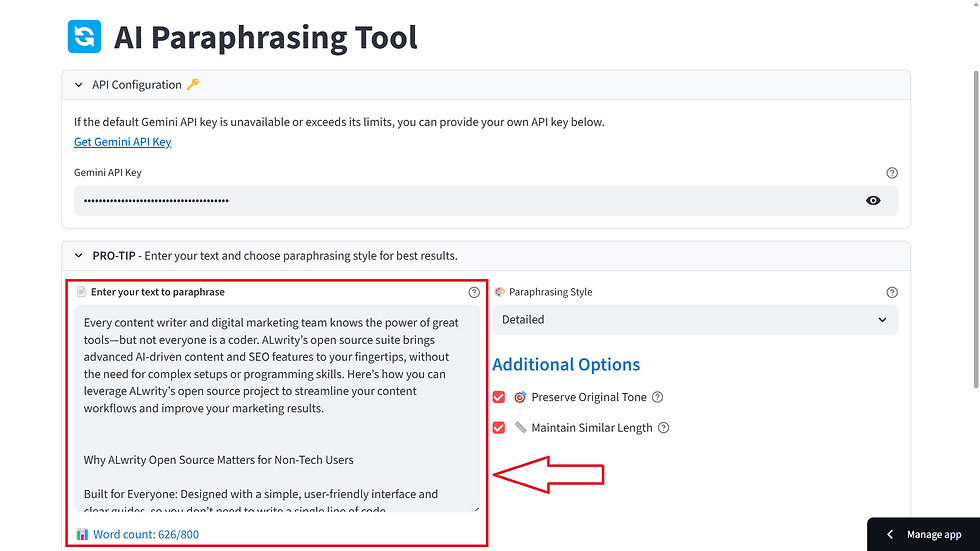
Choose a paraphrasing style from the following options: Balanced, Formal, Casual, Concise, and Detailed (more options are coming soon).

4. Configure options (preserve tone, maintain length). You can click the check box to select it.

5. After completing all the steps, click the "Paraphrase Text" button to paraphrase your desired text.

6. After you click the "Paraphrase Text" button, you will see the complete paraphrased text below. The process takes 2-5 seconds and produces ready-to-use content.

COMMON USE CASES
Content Marketing
Create multiple versions of blog posts for different platforms. Use formal style for LinkedIn, casual for social media, and detailed for your website.
Academic Writing
Students can rephrase sources while maintaining academic integrity. The formal style ensures a professional tone suitable for academic papers.
Business Communication
Transform business documents for different audiences. Create formal proposals for executives and casual updates for team members.
SEO Content
Generate unique content variations for different keywords and landing pages. This helps avoid duplicate content penalties and improves search rankings.
BEST PRACTICES
Start with a quality source text. Well-written, grammatically correct input produces better results.
Choose the right style for your audience. Professional audiences prefer formal style, while social media audiences respond better to casual tone.
Always review the output. While AI is sophisticated, human oversight ensures the content meets your standards.
Preserve important keywords. The tool maintains keyword density while creating fresh content.
TECHNICAL DETAILS
System Requirements:
Python 3.7+
Internet connection
Google Gemini API key (free from Google AI Studio)
Performance:
Processing time: 2-5 seconds
Word limit: 800 words
Real-time word counting
Copy-to-clipboard functionality
FREQUENTLY ASKED QUESTIONS
1: How accurate is the paraphrasing?
The tool uses Google Gemini 2.0 Flash, which provides high accuracy while maintaining the original meaning. Always review output before publishing.
2: Can I use paraphrased content commercially?
Yes, the content is original and can be used for any purpose. Review the content to ensure it meets your requirements.
3: Is there a usage limit?
Usage depends on your Google Gemini API key limits. The free tier provides generous usage for most users.
4: Does it work with other languages?
The tool is optimized for English content and delivers the best results with English text.
5: How do I get the best results?
Use clear, well-written source text. Choose the appropriate style for your audience. Always review the output before using it.
CONCLUSION
AI paraphrasing tools save time and improve content quality. Our tool uses Google Gemini AI to provide accurate, natural-sounding paraphrasing with multiple style options.
Whether you're creating content variations, avoiding plagiarism, or adapting text for different audiences, AI paraphrasing can streamline your workflow and improve results.
Try our AI Paraphrasing Tool today and experience the difference that advanced AI technology makes in content creation.
Keywords: AI paraphrasing tool, content rewriting, paraphrasing software, text rewriting, content creation, AI writing tools, paraphrasing online, rewrite text, content optimization


Comments